

.svg)


.avif)


.webp)


.webp)

.webp)
.webp)
.webp)

.webp)

.webp)
.webp)


Sales leadership used to be a numbers game of headcount. If you wanted to double revenue, you had to double the size of your team. You hired ten reps, hoped three were top performers, and accepted that the other seven would struggle to hit quota. This approach is expensive and inefficient. It also creates inconsistent customer experiences.
There is a better way to scale. The goal for modern Founders and VPs of Sales is not to replace their team with robots. The goal is to use technology to maximize the output of the talent you already have. Imagine a scenario where your top performer currently handles five concurrent deals effectively. Now imagine that same top performer handling fifty concurrent deals with the same level of personalization and attention to detail.
That is the promise of AI in B2B sales. We want to build a system where a single high-performing human can manage the workload of an entire traditional sales team. Once you achieve that level of efficiency, you do not stop hiring. You simply hire more top performers and plug them into this high velocity system. This guide will walk you through the seven steps to make this a reality.
Step 1: Conducting an Audit to Find Opportunities For AI
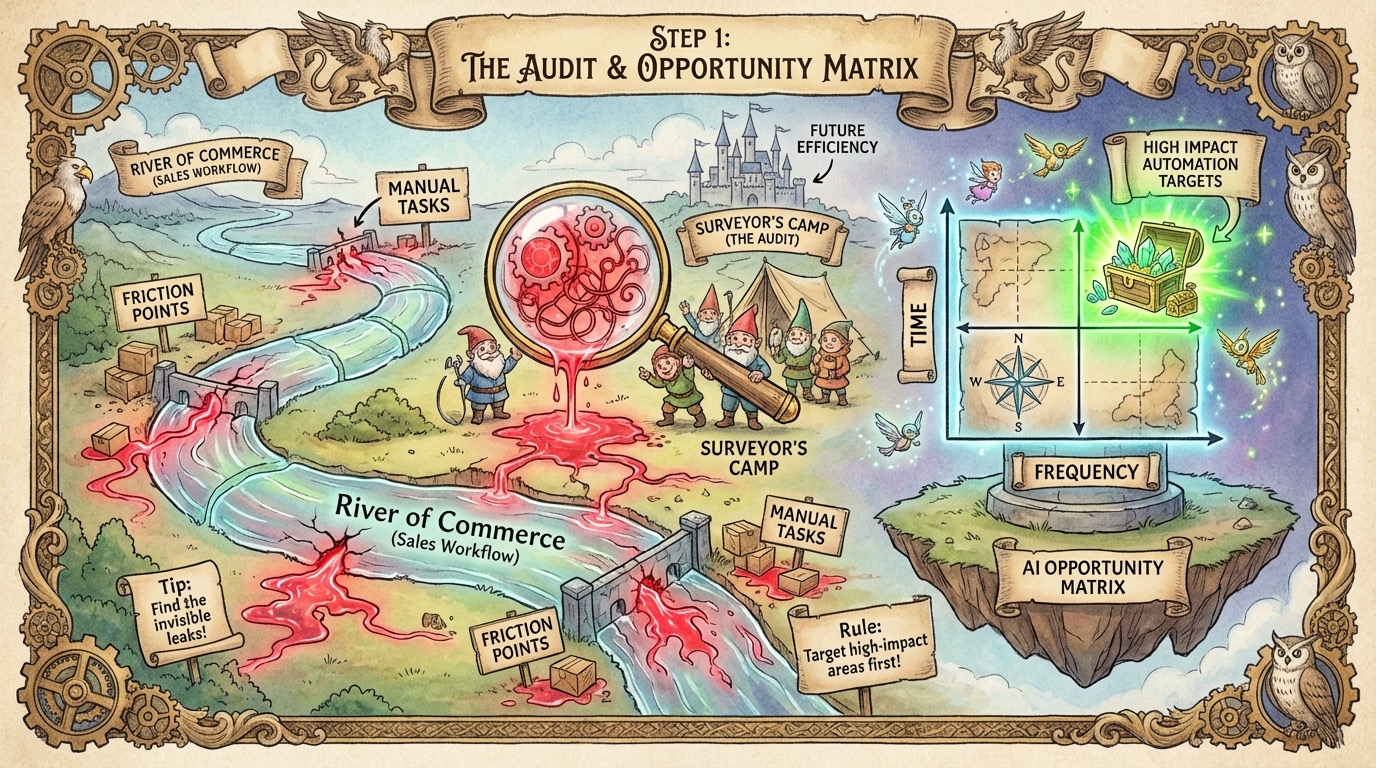
The biggest mistake leaders make is buying tools before they understand their problems. They sign up for ChatGPT, Gemini, or a dozen automated outreach tools and tell their team to "figure it out." This leads to chaos. It results in generic spam that damages your brand.
Before you spend a dollar on software, you must audit your current operations. You need to identify exactly where your process is broken, slow, or expensive. This audit builds the foundation for a structured transition to an AI-first sales organization. You cannot automate a process that you do not understand.
Reviewing Your Entire Sales Process for Gaps
Start by looking at your sales workflow from the moment a lead enters your CRM to the moment the contract is signed. You need to look at this holistically. Do not just look at the sales calls. Look at the administrative work that happens between the calls.
Ask your team where they get stuck. Look for the moments where a deal goes dark. Is it because the follow-up email took two hours to write? Is it because the rep forgot to update the CRM? You are looking for friction. Identify every manual touchpoint where a human has to type, search, copy, or paste data. These are your gaps. They are the invisible leaks draining productivity from your department.
Using the AI Opportunity Matrix to Prioritize Tasks
Once you have a list of tasks, you need a system to evaluate them. The best way to do this is with the AI Opportunity Matrix. Draw a graph. The x-axis represents "Frequency" (how often the task is done). The y-axis represents "Time" (how long the task takes to complete).
Plot every task from your audit on this graph.
Focus immediately on the upper right quadrant. These are tasks that are High Frequency and High Time. Your reps do them every day, and they take a long time to finish. Writing personalized prospecting emails often falls here. Researching prospect financials falls here. These are your prime targets for AI augmentation.
Look at the other quadrants as well.
High Frequency, Low Time: These are small, annoying tasks like data entry. They are ripe for simple automation or scripts.
Low Frequency, High Time: These are complex projects done rarely, like quarterly business reviews. AI can help here, but the ROI is lower because they happen less often.
Low Frequency, Low Time: Ignore these. They are not worth the engineering effort to fix right now.
Identifying High Impact Tasks for using AI
Beyond the matrix, you must look for the "impossible" tasks. These are things your team currently does not do at all because they are too time-consuming. If they could do them, the impact would be massive.
Consider sales enablement materials. In a traditional model, you might create a bespoke slide deck and a custom ROI calculator for a million-dollar enterprise deal. You would never do that for a $10,000 deal because the math does not work. The rep cannot spend four hours on a deal that size.
AI changes this equation. With the right setup, generating a custom slide deck and ROI analysis for a small deal takes minutes, not hours. This allows you to bring enterprise level service to every single prospect in your pipeline. Identifying these opportunities allows you to differentiate yourself from competitors who are still rationing their effort based on deal size.
Selecting the Top Areas to Augment with AI
You now have a list of bottlenecks from your matrix and a list of high-impact opportunities. Do not try to fix them all at once. If you try to overhaul your prospecting, discovery, demo, and closing processes simultaneously, your team will revolt.
Select one specific area to focus on first. Look for the area where you can show a quick win. Usually, this is the "High Frequency, High Time" quadrant from your matrix. If your reps spend ten hours a week researching prospects, and you can cut that to one hour using AI, you immediately give them nine hours back to sell. Solve one problem completely before moving to the next. This builds momentum and buy-in from the team for the changes to come.
Action Steps:
1. Map out every step of your current sales process.
2. Survey your sales team to ask them which tasks they spend time on.
3. Plot these tasks on the AI Opportunity Matrix (Time vs. Frequency).
4. Identify one "impossible" task that you would do if you had unlimited time.
5. Pick exactly one workflow to automate first based on your data.
Steps 2 and 3: Mapping Workflows and Ensuring Data Readiness
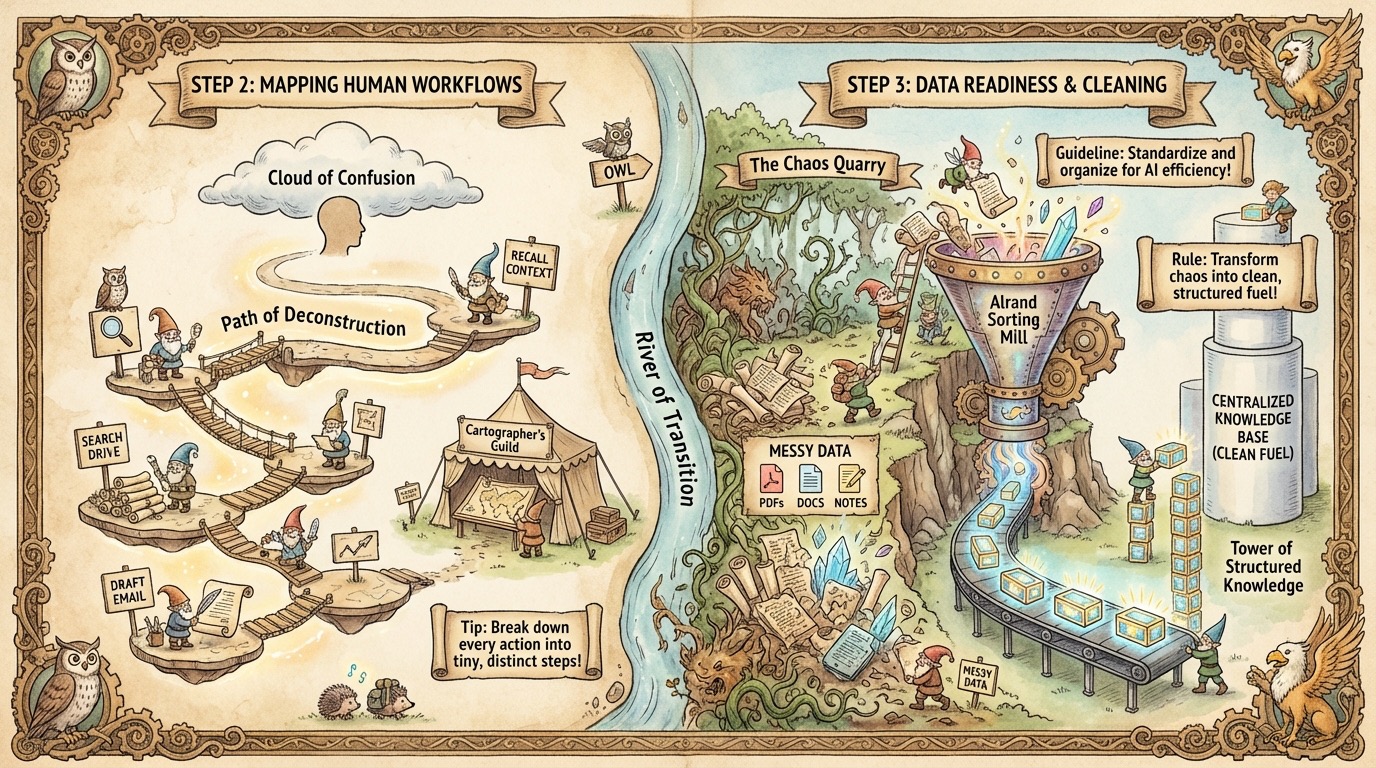
You have identified the high impact areas in your sales process. You know exactly which bottleneck you want to fix first. Now you might feel the urge to immediately start writing prompts or buying software. You must resist this urge. Automating sales process with AI fails when leaders skip the foundational work of mapping workflows and preparing data.
AI models are not omni intelligent masters of our world. They are incredibly powerful processing engines. If you feed them vague instructions and disorganized information, they will produce hallucinations and generic nonsense. To build a system that actually works, you must first deconstruct how your best humans do the job. Then you must organize your data so the AI can access the same information your top performers use (some of it might be the knowledge/expertise in their brain).
Breaking Down Human Steps in the Sales Workflow
Most people drastically underestimate the complexity of their daily tasks. If you ask a sales rep what they did to send a proposal, they will say, "I just wrote it up and sent it." This is not helpful for automation. You cannot automate "just wrote it up."
You need to map the workflow with extreme granularity. You must capture every micro decision and micro action. Let's look at the example of sending a follow up email after a discovery call.
A human does not simply "write the email." The real process looks like this:
1. Open the CRM to find the contact.
2. Review handwritten notes from the call to recall pain points.
3. Search the internal Google Drive for a relevant case study based on the prospect's industry.
4. Decide which pricing tier fits their budget.
5. Draft the subject line.
6. Write the body copy.
7. Attach the PDF case study.
8. Proofread.
9. Send.
To automate this, you must document all nine steps. You also need to establish a time baseline. How long does Step 2 take? How long does Step 4 take? You need to know that the total process currently takes 22 minutes per lead. This baseline allows you to measure success later. If the AI version takes 2 minutes, you have a clear metric of success. Without this level of detail, you are guessing at your requirements.
Determining Where Human Expertise Adds Value vs. AI
Once you have your granular map, you have to analyze the "why" behind each step. You need to identify the specific context a human brings to the table. This is the secret sauce that makes your top performers better than your average reps.
Use the "Offshore Test" to figure this out. Ask yourself: "Why couldn't I hire someone cheap in a different time zone to do this task?"
Usually, the answer is "because they don't know our business" or "they don't have the same expertise that the rep has." This reveals the context gap. If an offshore assistant cannot do the task because they lack specific knowledge, the AI will fail for the exact same reason.
If the rep selects a specific case study because they "just felt it was right," you have a problem. You need to interrogate that feeling. Why was it right? Was it because the company size matched? Was it because the competitor mentioned in the call is also mentioned in the case study? You must turn "gut feeling" into explicit logic. AI needs rules and patterns. It cannot operate on intuition. By defining the specific value of human expertise, you create the instructions that guide the model.
Organizing Data to Support an AI First Sales Organization
You have the map and the logic. Now you need the fuel. AI runs on data. Specifically, it runs on text. Developing AI driven B2B sales strategies requires you to audit where your information lives.
Many sales organizations act as data silos. The pricing strategy is in the VP's head. The updated case studies are on the marketing manager's laptop. The objection handling scripts are in a Word doc from 2019 that nobody uses. This is a disaster for automation.
If the AI cannot read the data, it does not exist. You must move your critical information into a centralized, accessible format. This often means converting messy formats into clean text.
* Do not lock text inside image based PDFs.
* Do not rely on "tribal knowledge" shared over coffee.
* Do not leave critical customer details in private notes.
You must build a knowledge base. This could be as simple as a structured Notion page or a clean spreadsheet. The goal is data readiness. If you want the AI to answer security questions on a questionnaire, the answers must exist in a document the AI can read. If you want the AI to suggest products, your product catalog must be up to date and digital.
Capturing Context Like Sales Call Recordings for Better Inputs
The most valuable data source for sales automation is the sales conversation itself. This is where the gold lies. In the past, we relied on sales reps to type summary notes into the CRM. Humans are terrible at this. They forget details. They bias the information. They omit things they think are unimportant.
To get high quality outputs from AI, you need high quality inputs. You must record every call. More importantly, you must transcribe every call.
The raw transcript provides the AI with the exact phrasing the customer used. It captures their tone, their specific objections, and the feature requests they prioritized. When you feed a raw transcript into an LLM, it can extract context that a human might miss. It can reference the prospect's exact words in a follow-up email. This creates a level of personalization that feels deeply human.
Without the recording and transcript, the AI is guessing. It is trying to write a personalized email based on three bullet points in Salesforce. That leads to generic spam. With the full transcript, the AI has the context required to perform like a top performing salesperson.
Action Steps:
1. Select your target task and write down every single micro step required to complete it.
2. Time yourself doing the task manually to set a baseline.
3. Identify the "intuition" steps and write down the logic behind them.
4. Centralize all necessary reference documents (pricing, case studies) into a text-readable format.
5. Turn on call recording and transcription for your sales team immediately.
Steps 4 and 5: Designing the Architecture and Building the Tools
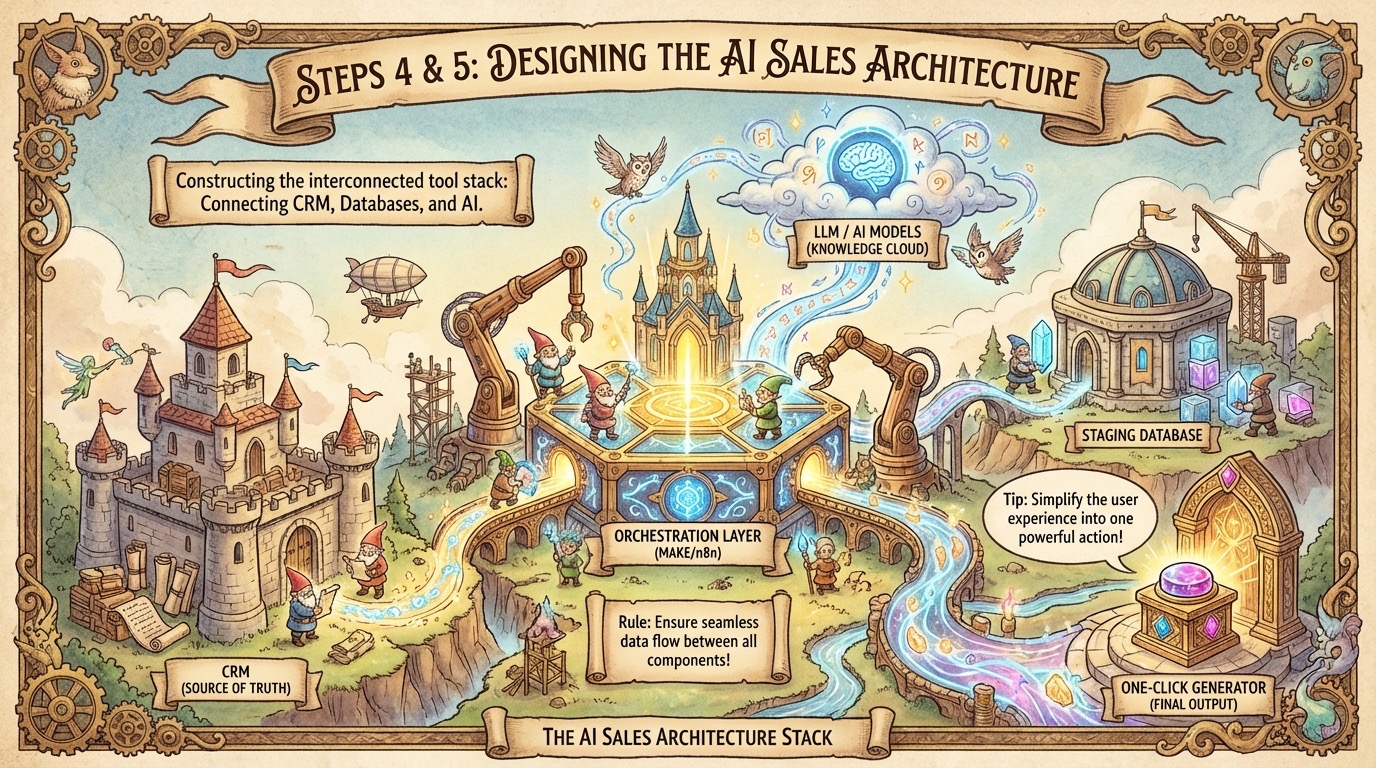
You have audited your process. You have mapped your workflows step by step. You have cleaned your data and started recording calls. Now comes the moment where strategy transforms into reality. This is the technical implementation phase where you select your tools and construct the actual engines that will power your new process.
Many leaders get stuck here because they are waiting for a single software platform to solve every problem. That platform does not exist. To achieve true AI sales automation, you must build a stack of tools that talk to each other. You are acting as the architect of a system that will run specifically for your unique business needs.
Selecting the Right Tools
Your tool stack determines the ceiling of your efficiency. If your systems cannot pass data back and forth, your automation will break. You need a set of tools that allows for seamless integration.
Most modern stacks revolve around three core components. First, you need your source of truth. This is usually your company CRM, like Salesforce or HubSpot. This is where the final data lives. Second, you need a flexible database to stage and manipulate information. Airtable is excellent for this. It allows you to organize unstructured data from calls and emails before sending it to the CRM.
Third, and most importantly, you need an orchestration layer. Platforms like Make or n8n serve as the connective tissue. They listen for a trigger, like a new lead form, and then execute a series of actions across your other tools. They send data to the AI models, retrieve the answer, and update your database. This setup gives you control. You are not relying on a black box feature inside a sales tool. You are building a custom pipeline that executes your exact workflow.
Using Context Engineering to Improve LLM Outcomes
Once your tools are connected, you must decide what information to send to the AI. This is called context engineering. It is the act of determining the minimum amount of context required to provide the large language model (LLM) for the best possible outcome.
If you send too little information, the AI hallucinates. If you send too much irrelevant noise, the AI gets confused and produces generic results. You need to feed it exactly what it needs and nothing more, nothing less. For example, if you want the LLM to write a marketing email don't give it a book on marketing, just provide the section of the book that teaches how to write a strong marketing email.
Here are some more examples. When a prospect fills out a form, capture their industry and company size. When a rep has a discovery call, have the AI extract the top three pain points immediately. Store these neatly. When it is time to generate a proposal later, you do not need to ask the rep for this information again. The system pulls the industry, company size, and pain points automatically to construct a highly relevant document. The data you capture in Step 1 fuels the automation in Step 5.
Building the First Version of Your AI Sales Automation
When you start building the actual workflow in a tool like Make, it will look complicated. You might have thirty steps involving data formatting, API calls, and error checking. The back end logic handles the heavy lifting so the human does not have to.
However, the front end user experience must be radically simple. Your sales reps do not care about API keys or webhooks. If the tool is hard to use, they will ignore it. The complexity must remain hidden.
Design the interaction to be frictionless. For the sales rep, executing a complex AI workflow should feel like magic. They should click a single button in their CRM that says "Generate Follow Up." In the background, your system grabs the transcript, analyzes it, drafts the email, and pushes it as a draft into their inbox. To the rep, it took a few seconds. To the system, it was a complex operation. This simplicity is the key to effective AI sales enablement. If you force reps to learn prompt engineering to use the tool, you have failed.
Writing Effective Prompts to Guide the AI Models
The instructions you give the AI are just as important as the data you feed it. These instructions are your prompts. Writing effective prompts is an iterative process. You will rarely get the perfect output on the first try.
You need to treat your prompts like code. Test them against different scenarios. If you are generating posts for social media, review how the output compares to your own human writing. Does it sound pretty different? Then revisit the prompt and make some changes.
The most important thing you can do in your prompts is to list out the step by step instructions and describe how to follow each step. This gives the LLM exactly what it needs to do and how to do it. The rule I have is that if a junior employee cannot read the instructions and know exactly what to do and be able to do it well, you need to write better instructions.
Action Steps:
1. Choose your automation platform (e.g., Make or n8n) and connect it to your CRM.
2. Set up a staging database (like Airtable) to handle raw data processing.
3. Identify the specific data points needed for your first automation and map where they live.
4. Build a "one click" interface for your reps to trigger the automation.
5. Write and test your core prompts.
Step 6: Measuring the Impact of Automating Sales Processes with AI
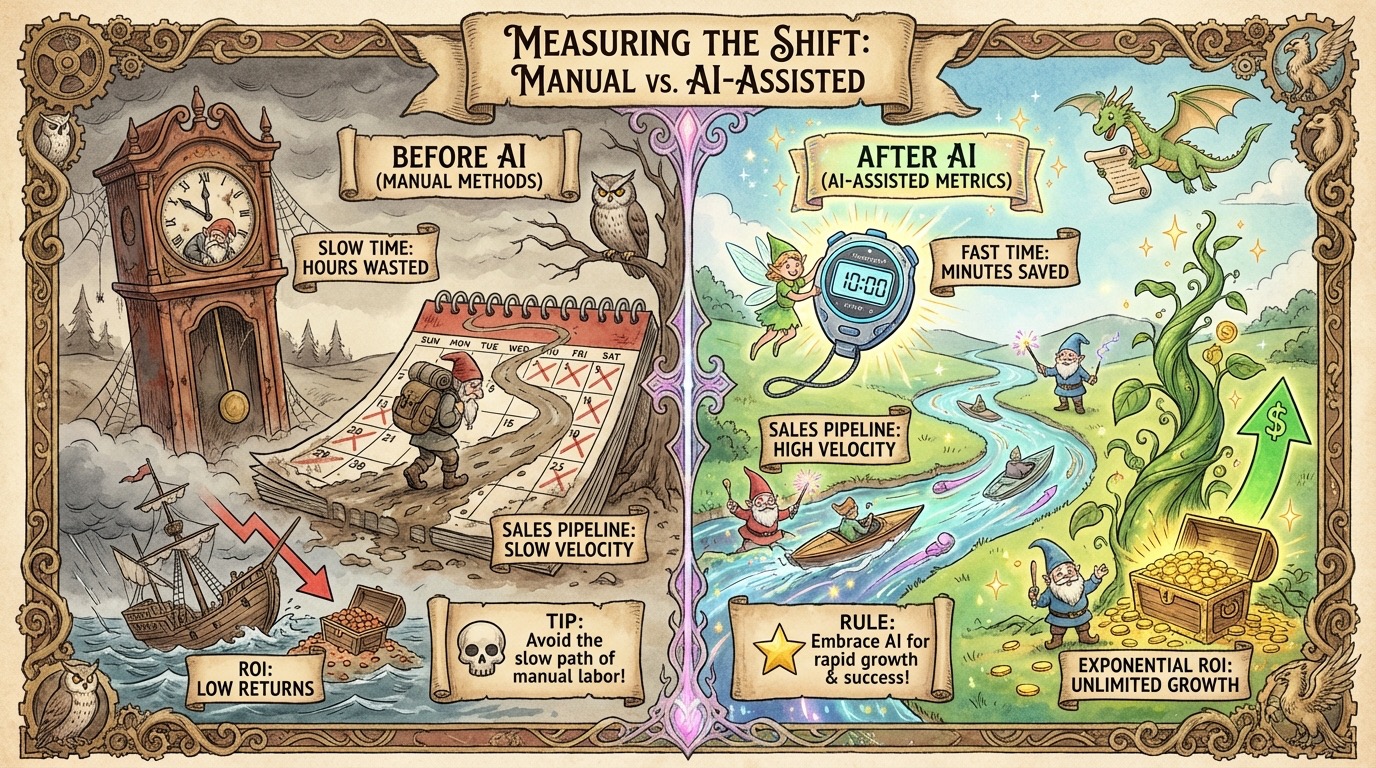
You have audited your process and mapped your workflows. You have organized your data and built the tools. The system is live. Now you must answer the most important question of all. Does it actually work?
Implementation is only half the battle. The other half is validation. You cannot assume your new AI in B2B sales setup is better just because it is new or high tech. You need hard data. You need to prove that the investment of time and engineering effort is paying off in tangible business results. Without specific metrics you are flying blind. You risk building a complex system that generates noise instead of value. This step is about verifying your assumptions and ensuring the machine you built is delivering on its promise.
Tracking Time Saved by the Sales Team
The most immediate impact of automation should be the return of time to your sales representatives. This is why you established a time baseline in Step 2. You need to look at that data again.
If your manual process for researching a lead took fifteen minutes, you need to measure how long the AI assisted process takes. Perhaps the script runs in thirty seconds and the rep spends two minutes reviewing the output. That is a net gain of twelve minutes and thirty seconds per lead.
Multiply that gain by the volume of leads a rep handles in a week. If they process fifty leads, you have just given them back over ten hours of their week. That is a massive operational victory. It validates the decisions you made during the "AI Opportunity Matrix" exercise. You are no longer guessing if the task was worth automating. You have the math to prove it. Track these hours religiously. Report them to leadership. This metric is your first line of defense when justifying the budget for these tools.
Monitoring Changes in Deal Velocity and Conversion Rates
Time savings are excellent, but they are a leading indicator. The lagging indicators are revenue metrics. The ultimate goal of AI driven B2B sales is not just to let your sales team go home early. The goal is to close more deals faster.
You must monitor the velocity of your pipeline. Look at how many days a deal sits in a specific stage. When you automate administrative friction, deals should move forward with less resistance. If a rep no longer has to wait until Friday to write follow-up emails, the prospect gets a response on Tuesday. This cuts three days of lag time out of the cycle. Over the course of a complex deal, those saved days add up to weeks.
Watch your conversion rates closely as well. With better data and faster responses, you should see an uptick in positive replies. If conversion rates drop, it is a warning sign. It suggests that while you are moving faster, you might be sacrificing quality. This balance is critical. It’s ok if it drops a little but if the volume increase doesn't make up for the drop in conversion, you have work to do on the prompting or context engineering to get a higher quality output.
Comparing AI Output Quality Against Manual Effort
You cannot trust the machine blindly. Especially in the early days, you must rigorously audit the quality of the work the AI produces.
Run a blind test. Take five emails written by your best sales rep and five emails generated by your new system. Remove the names and formatting. Show them to your sales manager or a VP. Ask them to identify which ones were written by the human.
If they can easily spot the AI version because it sounds robotic or generic, you have a problem. You need to go back to Step 5 and refine your prompts or context. However, if they cannot tell the difference, or better yet, if they prefer the AI version, you have achieved a significant milestone.
You should also look for factual hallucinations. Does the AI invent case studies that do not exist? Does it promise pricing tiers you do not offer? Regular quality assurance checks prevent these errors from reaching the customer. You want the AI to act as a force multiplier for your best talent, not a replacement for their judgment.
Assessing the ROI of Your New Tech Stack
Finally, you need to look at the financial picture. Modern AI tools come with costs. You have subscriptions for automation platforms like Make or n8n. You have usage costs for API tokens from OpenAI or Anthropic. You need to weigh these costs against the value you created.
This math is usually very favorable. Calculate the hourly cost of your sales reps. If you pay a rep $50 an hour and your system saves them ten hours a week, you are saving $500 per week per rep. That is $2,000 a month in regained productivity.
Compare that to the cost of the software. Even a heavy API usage bill might only run a few hundred dollars a month. The ROI is often exponential. Presenting these numbers to your finance team transforms the conversation. You are no longer asking for a software expense. You are presenting a strategy that lowers your customer acquisition cost and increases revenue per employee. This is how you secure long term buy in for your AI initiatives.
**Action Steps:**
1. Track the old "manual time" baseline against the new "AI assisted" time per task.
2. Review the average "Time in Stage" for deals managed with the new system versus the old average.
3. Conduct a weekly blind test of AI content versus human content with your leadership team.
4. Calculate the monthly cost of your AI tools and compare it to the dollar value of the hours saved.
Step 7: Optimizing Your New AI Driven Sales Process
You have built the system. You have validated the data. You are seeing the initial ROI. It is tempting at this stage to declare victory and move on to the next project. This is a trap. The launch of your automation is the starting line.
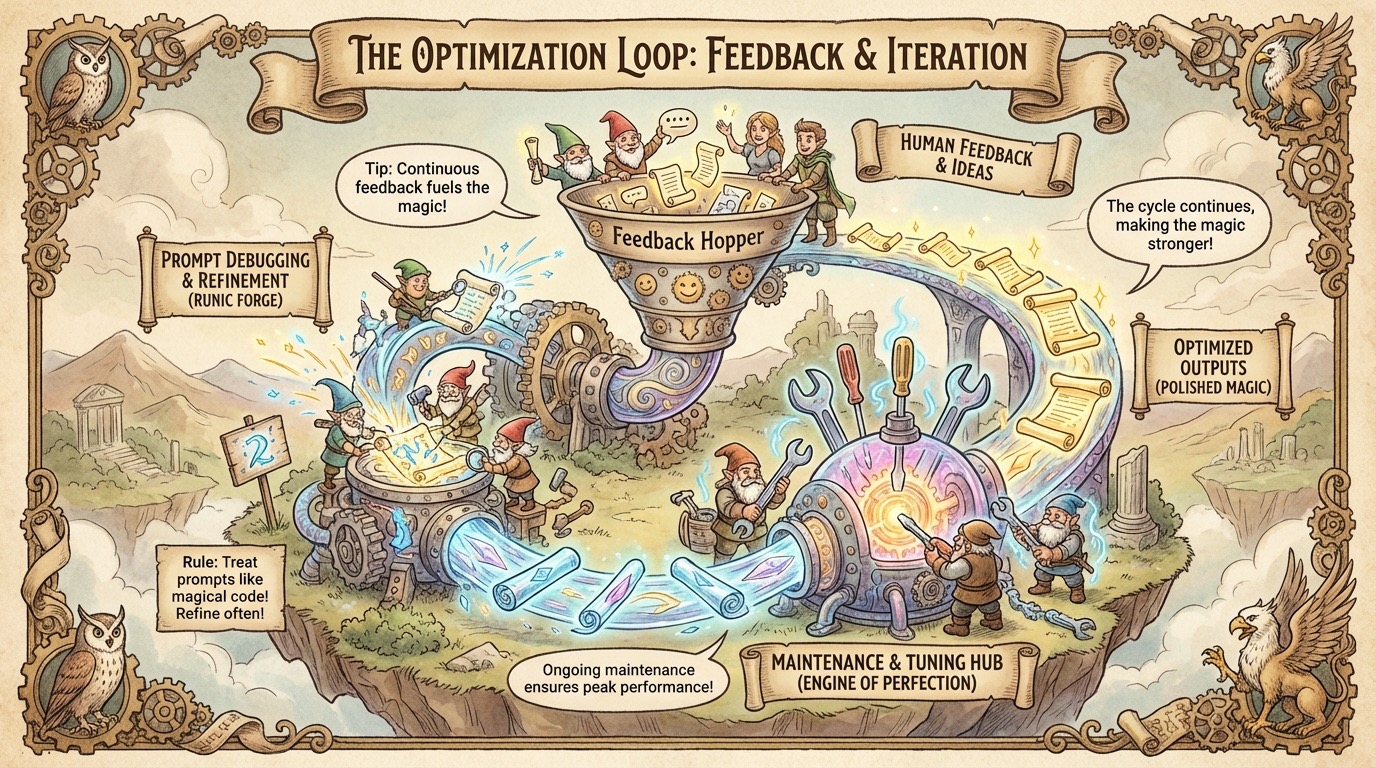
Building a robust system requires an obsession with maintenance. You must treat your sales operations like a product manager treats software. You need to constantly look for bugs. You need to release updates. You need to iterate. The difference between a failed experiment and a game changing competitive advantage often comes down to what happens in the weeks after the initial rollout.
Gathering Weekly Feedback on AI Outputs from the Team
Your sales representatives are your quality assurance team. They are the ones staring at the AI outputs every single day. They know exactly when the system feels "off" or when the emails sound robotic. Unfortunately, most reps will not report these issues voluntarily. They will simply stop using the tool and go back to doing things manually or they will manually fix little issues (which isn't a big deal but wouldn't you rather your outputs to need as few edits as possible?).
You must aggressively solicit their feedback. Create a structured loop where criticism is encouraged. Set up a dedicated Slack channel or a simple Google Form specifically for "AI Bug Reports."
Review this feedback in a scheduled weekly meeting. Do not just ask "is it working?" Ask specific questions. Did the AI miss the tone on the enterprise leads? did it reference a competitor we no longer track? Did it hallucinate a feature we do not have? By consistently gathering this data, you prevent small annoyances from becoming fatal adoption blockers. This human in the loop approach is the only way to catch the subtle context errors that a machine will never notice on its own.
Modifying Prompts to Fix Errors and Improve Quality
Once you have the feedback, you have to act on it. Usually, the fix lies in the prompt. Think of prompt engineering as debugging code. If the feedback says the emails are too aggressive, look at your tone instructions. You might have told the AI to be "persuasive." Change that word to "helpful" or "consultative" and run a test. If the AI is writing emails that are too long, add a hard constraint. Tell it "do not exceed 150 words."
Be precise with your adjustments. Change one variable at a time so you know what fixed the problem. Keep a changelog of your prompts. If you make a change that makes things worse, you need to be able to revert to the previous version immediately. This iterative tightening of the guardrails is how you move from generic output to content that sounds exactly like your best salesperson.
Adjusting Workflows to Remove Friction Points
Sometimes the problem is not the prompt. The problem is the architecture itself. You might find that the automation triggers too early. Perhaps the system drafts a follow up email before the call notes are even saved in the CRM. This results in a generic message because the AI lacked the necessary context.
In these cases, you must go back to your orchestration tool (like Make or n8n) and adjust the workflow. You might need to add a "delay" module to give the rep time to enter their notes. You might need to add a filter that stops the automation if certain data fields are empty.
Scaling Successful AI Experiments Across the Department
You started this journey with a pilot program. You likely focused on a small group of top performers and a single use case. Now that you have optimized the prompts, fixed the workflows, and proven the ROI, it is time to scale.
As you expand, you are building the infrastructure for an AI-first sales organization. You are creating a standard operating procedure where every new hire plugs into this high velocity system on day one. The optimized workflow you built becomes the default way of doing business. It ensures that every prospect receives the same high level of attention and personalization, regardless of which rep they talk to. This consistency is the ultimate prize of the entire process.
Action Steps:
1. Create a specific "AI Feedback" channel in your internal communication tool.
2. Schedule a 30-minute weekly review to review outputs.
3. Update your prompt library based on the specific errors reported by the team.
4. Identify any issues with your automations where the LLM isn't getting the context it needs.
5. Select more reps to onboard into the system based on the success of your pilot group.
